Ganesh Utsav is one of those festivals that fills a home with color, music and a quiet kind of joy. There’s the fragrance of flowers and incense, the glow of the lamps, and the moment when you simply sit beside Bappa and feel at peace.
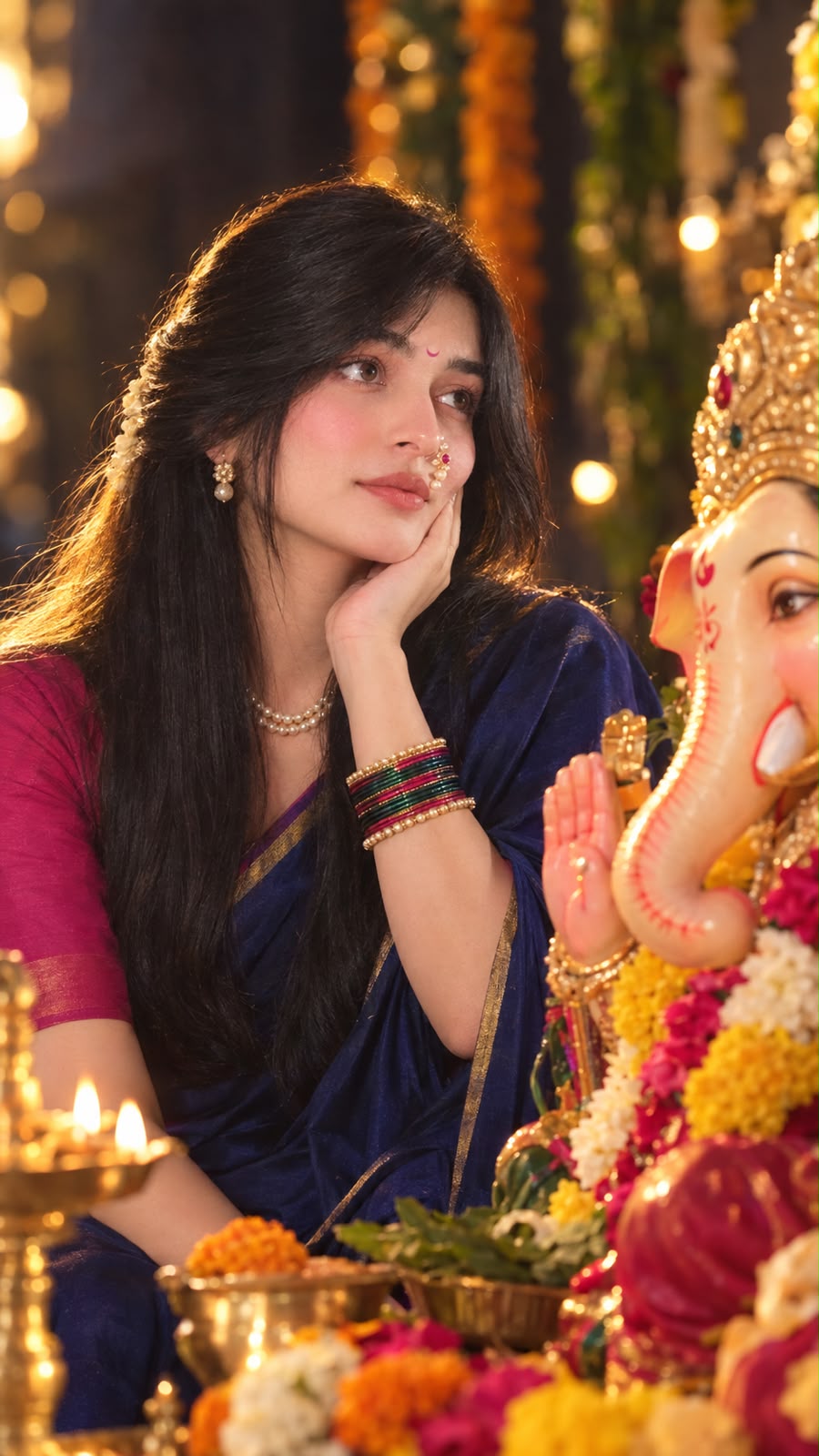
That’s the feeling this portrait is built to capture. A woman sits calmly beside a Lord Ganesha idol, gazing at him with a gentle smile, her chin resting softly on her hand. It’s warm, personal and a little emotional, the sort of picture that makes people stop scrolling.
With the right prompt, AI can create this kind of image in minutes. This guide walks you through the prompt, why it works, and how to get a result that looks like a real festival photograph while still keeping the person’s face recognizable.
What Makes This Portrait Special
Plenty of festival photos are cheerful and busy. This one is deliberately quiet. The woman isn’t posing for the camera. She’s looking at the idol, lost in a small moment of devotion, and that is what gives the image its emotional pull.
Several details work together to create the mood:
- A calm, devotional expression. A soft smile and a hand under the chin make the pose feel natural rather than staged.
- Traditional Maharashtrian styling. The saree and jewelry root the image firmly in the festival.
- Dramatic golden backlight. It creates a glowing outline around her hair.
- Soft front flash. It lights the face gently so the skin looks warm and clear.
- A deeply blurred background. The creamy bokeh keeps all attention on her and the idol.
- A vertical 9:16 frame. It suits Instagram Stories, Reels, WhatsApp status and phone wallpapers.
The Outfit and Accessories
The styling is a big part of why this image feels authentic to Ganesh Utsav.
She wears a deep navy-blue silk saree with a thin gold border, paired with a dark pink blouse. The contrast between the cool navy and the warm pink is rich without being loud, and the gold border catches light beautifully.
The accessories complete the Maharashtrian look. A pearl nath with small red stones is the signature detail, and it’s followed by a pearl necklace, pearl earrings, colorful bangles and a small pink crescent bindi. Pearls glow nicely under golden light, which is one reason this combination photographs so well.
Her hair is straight and silky, half-tied with the rest flowing naturally. Add nude lipstick, soft natural makeup and glowing skin, and the whole look feels elegant without being overdone.
Why the Lighting Matters
Lighting is what turns a nice portrait into a cinematic one. This prompt uses two sources on purpose.
The first is a strong golden backlight. It sits behind her and creates a thin glowing edge around her hair, often called a rim light. It also separates her from the background and adds a warm, festive atmosphere.
The second is a soft front flash on the face. Without it, a backlit subject can fall into shadow. A gentle flash keeps the face bright and detailed while the golden light behind adds the drama.
Together they create rich contrast, with glowing hair, warm skin and a softly lit idol, which is exactly the kind of look people expect from a professional festival shoot.
Why Camera Details Help
You might notice the prompt mentions an 85mm lens and f/1.8. These aren’t random technical terms.
An 85mm lens is a classic portrait choice because it flatters faces and keeps proportions natural. An f/1.8 aperture creates a shallow depth of field, which is what gives you that smooth, creamy bokeh behind her. Adding DSLR-style photography, HDR and photorealistic 8K detail nudges the AI toward sharp, high-quality results with realistic texture.
You don’t need to understand photography to use them. Just keep them in the prompt, and the AI will imitate the look of a real portrait lens.
Keeping the Face Recognizable
This is the part that matters most if you’re using your own photo.
Upload a clear reference photo of the woman and make sure the prompt asks the AI to preserve her exact facial features, skin tone, eyes, nose, lips, smile and hairline. The clothes, setting and lighting can all change, but the face should stay the same.
A few things help:
- Choose a well-lit photo where the face is fully visible.
- Avoid sunglasses, heavy filters and extreme angles.
- Don’t add extra face descriptions like eye color or age, since they can end up changing the identity you’re trying to protect.
The Main Prompt
Here’s the full prompt to use:
Create an ultra-realistic cinematic devotional portrait using the uploaded woman’s face as the primary reference. Preserve her exact facial features, skin tone, eyes, nose, lips, smile, hairline. She sits beside Lord Ganesha idol during Ganesh Utsav, gazing lovingly at Bappa with a peaceful smile, chin gently resting on her hand. She wears deep navy-blue silk saree with a thin gold border and dark pink blouse. Accessories: Maharashtrian pearl nath with red stones, pearl necklace, pearl earrings, colorful bangles, and small pink crescent bindi. Straight silky hair, half-tied with the rest flowing naturally. Nude lipstick, soft natural makeup, glowing skin. Strong golden backlight creates a hair rim light, with soft front flash on the face. Deep blurred background, creamy bokeh, rich contrast, hyper-detailed DSLR photography, 85mm, f/1.8, HDR, photorealistic 8K. Vertical 9:16 composition.
How to Use It, Step by Step
Start by picking your reference photo. Clear, front-facing and well lit is ideal. Crop it to a vertical shape if you can, since that helps the tool match the 9:16 format.
Upload the photo to your AI image generator first, then paste the prompt exactly as written. Tools like ChatGPT’s image generation and Google’s Gemini can both work with reference photos, though results will differ a little between them.
Generate a few versions. AI results vary from one attempt to the next, and the second or third often looks more natural than the first. When something needs fixing, change only one detail at a time, such as the saree color or the lighting, so you can see what made the difference.
Tips for Better Results
If your tool has a reference-strength setting, raise it when the face doesn’t look like the original and lower it if the image feels stiff or pasted on.
Look closely at the idol. AI sometimes distorts religious figures, so if Ganesha’s features look off, regenerate the image rather than accepting it. It’s worth the extra try, since the idol is central to the picture.
Check the hands and bangles too. Hands are a common weak spot for AI, and a chin resting on a hand is a tricky pose. If fingers look strange, try again.
Keep your wording simple. Clear, natural language usually works better than long lists of technical terms.
Common Mistakes to Avoid
Using a dark or blurry reference photo is the most frequent problem, because the AI can only keep the face it can see.
Another is over-describing the face, which can change her identity. Asking for too many accessories or decorations can also crowd the frame and pull attention away from the quiet emotion of the moment.
Finally, don’t skip the lighting instructions. Without the golden backlight and soft front flash, the image can look flat and lose its cinematic feel.
Ways to Use This Portrait
This style is lovely for Ganesh Chaturthi greetings, social media posts, profile pictures, WhatsApp status updates and family festival albums. Many people also create it as a gift or a keepsake for a festival they can’t celebrate in person.
Once you’re happy with the base look, try some variations. Change the saree to a deep green or maroon, switch the pose to hands folded in prayer, or move the scene to a decorated home mandap with flowers and lamps. As long as you keep the golden backlight and soft flash, the mood will carry over.
Frequently Asked Questions
Do I need a reference photo?
It’s strongly recommended. Without one, the AI creates a new face. With one, it can stay close to the person you have in mind.
Can I use this for a man or a child?
Yes. Change the outfit and accessories to suit the person, and keep the lighting and camera details the same.
Why does the idol look wrong?
AI can struggle with detailed religious figures. Try regenerating, or add a short description such as “a traditional clay Ganesha idol with flowers and a garland.”
Can I change the saree color?
Absolutely. Navy and pink is a lovely pairing, but you can swap in any colors you like.
Is it respectful to create devotional images with AI?
It’s a personal choice, but most people use these images as a heartfelt way to celebrate the festival. If you’re sharing the image, keep the portrayal of the deity respectful and accurate.
Final Thoughts
The best festival portraits aren’t the loudest ones. They’re the ones that capture a feeling: a quiet smile, a warm glow, a moment of gratitude beside Bappa.
This prompt brings that together with traditional styling, golden light and a soft, blurred background. Use a clear reference photo, keep the prompt as written, and try a few versions until one feels right.
Ganpati Bappa Morya.